
Download Degoo – Free Secure Cloud Storage for Photos, Files & Memories
Overview – Why Degoo Stands Out in the Cloud‑Backup Landscape
In a world where digital memories multiply faster than the storage on our devices, a reliable cloud backup solution has become a necessity rather than a luxury. Degoo, the brainchild of a Swedish startup, answers that call by offering a surprisingly generous amount of free space, robust security, and a straightforward user experience. While many cloud services lock the best features behind a paywall, Degoo hands you 100 GB of cloud storage at no cost, making it one of the most attractive options for anyone looking to offload photos, videos, documents, or any other personal files without immediately reaching for a credit card.
The service is built around a simple premise: give users a convenient, secure vault for their data and let them access it from virtually any device. Degoo’s free tier already eclipses the storage limits of most major competitors, and its tiered paid plans scale up to a massive 10 TB for power users or professionals who need massive archives. Moreover, the referral program adds an extra layer of incentive—invite friends and you both earn bonus space, turning storage expansion into a community effort.
Security is another cornerstone of Degoo’s offering. The platform employs 256‑bit AES encryption, zero‑knowledge architecture, and distributed storage replication across multiple data centers. In practice, this means that even if a data center were compromised, your files would remain unintelligible without your unique passphrase.
For privacy‑conscious users, this level of protection is akin to storing files in a digital bank vault that only you can open.
While Degoo excels in space, speed, and security, it does make certain trade‑offs. Features such as file versioning, real‑time syncing, and advanced sharing tools are absent, positioning Degoo more as a backup/archive solution than a collaborative workspace.
Nevertheless, for those whose primary goal is to preserve large collections of photos, videos, and documents without the overhead of complex syncing logic, Degoo provides an elegant, cost‑effective answer.
Key Features That Make Degoo a Competitive Cloud Backup Tool
- Massive Free Storage: 100 GB of cloud space is available without any subscription, far surpassing the typical 2‑15 GB offered by rivals.
- Scalable Paid Plans: Upgrade to 500 GB (Pro) or a massive 10 TB (Ultimate) for users with extensive archival needs.
- Military‑Grade Encryption: 256‑bit AES encryption combined with zero‑knowledge architecture ensures only you can decrypt your data.
- Distributed Data Replication: Files are split into encrypted chunks and stored across multiple global data centers, enhancing redundancy and resilience.
- Simple Drag‑and‑Drop Backup: Add folders to your backup library by clicking a button or dragging files directly into the app.
- Cross‑Platform Availability: Desktop apps for Windows, macOS, and Linux, plus Android mobile support (iOS currently unavailable).
- Referral Bonus System: Earn extra storage by inviting friends; each successful referral adds bonus space to both accounts.
- Fast Upload & Download Speeds: Optimized servers and CDN integration deliver quick transfer rates, even for large media libraries.
- Automatic Backup Scheduling: Set custom intervals for continuous protection of new files without manual intervention.
- Privacy‑First Policy: Zero‑knowledge encryption means Degoo staff cannot view your files, reinforcing trust and compliance.
Installation & Usage – Getting Started with Degoo in Minutes
Step‑by‑Step Account Creation
Starting with Degoo is deliberately frictionless. Visit the official website and click “Create Free Account.” You’ll be prompted to choose a username and password; no personal details like name or address are required, keeping your privacy intact from day one. If you prefer a quicker sign‑up, you can connect using an existing Google account, which automatically imports your basic profile information while still preserving Degoo’s zero‑knowledge encryption.
Downloading the Application
Once your account is active, navigate to the “Download” section. Choose the appropriate installer for your operating system (Windows .exe, macOS .dmg, Linux .deb/.rpm, or Android .apk). The installer size is modest—typically under 80 MB—so even slower connections can complete the download without hassle. After the download finishes, run the installer and follow the on‑screen prompts. The installation wizard automatically creates a desktop shortcut and adds Degoo to your system’s startup programs, ensuring continuous backup protection.
Configuring Your First Backup
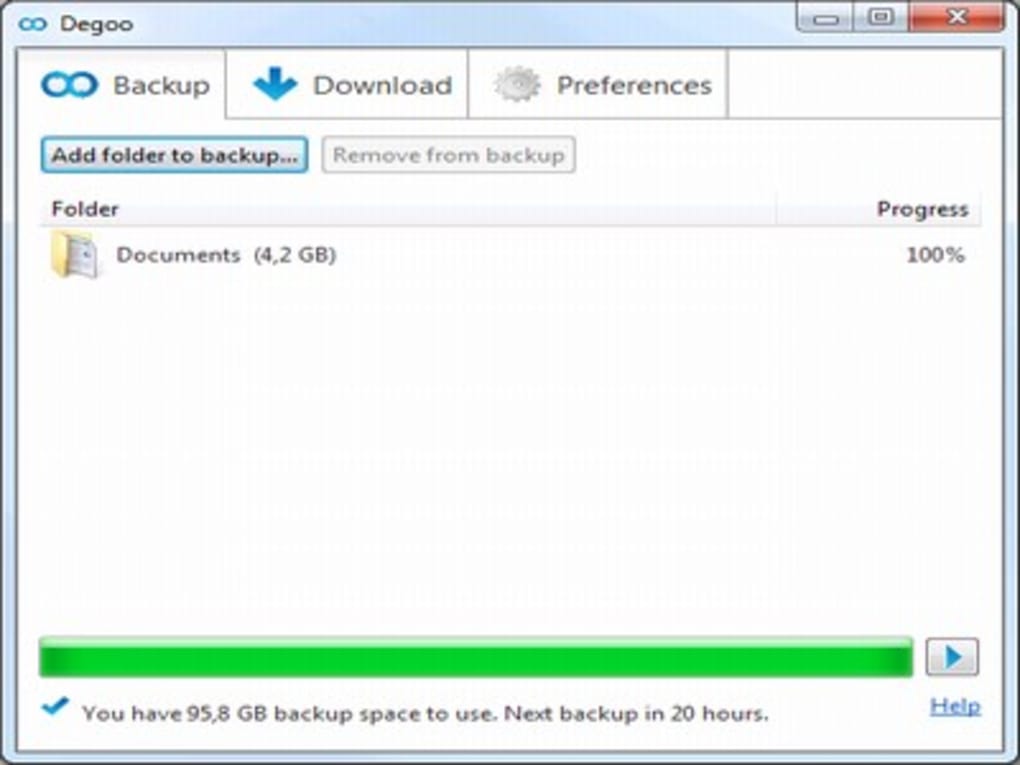
Launch Degoo and log in with the credentials you just created. The main dashboard presents three tabs: Backup, Recovery, and Preferences. Click the “Backup” tab, then select “Add Folder.” You can browse your file system or simply drag a folder onto the Degoo window. After selecting a folder, you’ll see options for backup frequency (daily, weekly, or manual) and bandwidth throttling, which is useful if you share an internet connection with others.
Recovering Files and Managing Space
When you need to retrieve a file, switch to the “Recovery” tab. Degoo displays a clean, searchable list of your uploaded items, organized by date and file type. Click any file to preview it directly in the browser, or select multiple items to download as a compressed ZIP archive. Because the free tier imposes a 90‑day inactivity rule, be sure to log in at least once within that window to keep your files active; otherwise, they will be purged. Paid plans lift this restriction, allowing indefinite storage.
Troubleshooting Common Issues
Most users encounter only minor hiccups, such as temporary upload delays caused by network congestion. Degoo’s built‑in status bar reports real‑time progress and error codes, and the support portal offers a searchable knowledge base. For persistent problems, you can submit a ticket directly from the “Preferences” > “Support” section, where the support team typically responds within 24 hours.
Compatibility, Pros & Cons – A Balanced Look at Degoo’s Strengths and Limitations
Operating System Compatibility
Degoo is designed to work on a wide range of platforms, ensuring that most users can access their cloud vault regardless of device preference. Official desktop clients are available for:
- Windows 7, 8, 10, and 11 (64‑bit)
- macOS 10.12 Sierra and later
- Linux distributions supporting .deb or .rpm packages (Ubuntu, Fedora, Debian, etc.)
Pros
- Generous 100 GB free tier eliminates the need for immediate payment.
- 256‑bit AES and zero‑knowledge encryption provide industry‑leading security.
- Fast upload/download speeds thanks to optimized server infrastructure.
- Simple drag‑and‑drop interface reduces the learning curve for non‑technical users.
- Referral program offers a practical way to earn additional storage.
- Scalable paid plans up to 10 TB cater to both casual users and professionals.
Cons
- No native iOS app limits accessibility for Apple mobile users.
- Lacks file versioning and real‑time syncing, making it less suitable for collaborative workflows.
- Free tier imposes a 90‑day inactivity rule, requiring periodic logins to retain data.
- Limited sharing capabilities; cannot generate shareable links with granular permissions.
- Advanced administrative controls (e.g., user management for teams) are absent.
Overall Verdict: Degoo shines as a free, secure, and straightforward backup solution, especially for users with large media libraries. Its primary drawbacks are the missing iOS app and limited collaboration tools, but for pure storage needs, it offers excellent value.
FAQ & Conclusion – Your Final Questions Answered and Next Steps
Frequently Asked Questions
-
Is Degoo really free, or are there hidden fees?
Degoo offers a completely free tier with 100 GB of storage. There are no hidden charges, but the free plan does require you to log in at least once every 90 days to keep your files active. Paid plans unlock additional storage and remove the inactivity restriction.
-
How secure is my data on Degoo?
Degoo uses 256‑bit AES encryption combined with zero‑knowledge architecture, meaning your files are encrypted on your device before they ever leave it. Only you know the decryption key, so even Degoo’s staff cannot access your data.
-
Can I access Degoo from an iPhone or iPad?
Currently Degoo does not have a native iOS application. iOS users can still access their files through the web interface at degoo.com, but the experience is not as seamless as the dedicated apps on other platforms.
-
What happens to my files if I cancel my subscription?
If you downgrade to the free tier, any data exceeding the 100 GB free limit will be marked for removal after a grace period. Files that remain within the free quota stay accessible, but it’s recommended to back up or download excess data before canceling.
-
Does Degoo support automatic photo organization or tagging?
Degoo’s primary focus is secure backup, so it does not include advanced photo‑sorting or AI‑based tagging features found in services like Google Photos. However, you can manually organize files into folders before uploading.
Conclusion – Should You Download Degoo Today?
After weighing the generous free storage, top‑tier encryption, and user‑friendly interface against the lack of iOS support and limited collaboration tools, Degoo emerges as a compelling choice for individuals and small teams whose main priority is safeguarding large volumes of media and documents. If you’re frustrated by constantly juggling external hard drives or watching your device’s storage bar turn red, Degoo provides a secure, cloud‑based sanctuary that you can reach from virtually any desktop or Android device.
Ready to give your files the space they deserve? Download Degoo now and claim 100 GB of free, encrypted cloud storage in seconds. Remember, the sooner you start backing up, the sooner you’ll have peace of mind knowing your memories are safe from hardware failure, loss, or theft.







